
In the last episode of The Strange World of Politics, I was walking around Culver City collecting signatures from registered voters so I could qualify to run for City Council.
Once I had enough signatures, it was time to go back to where this adventure started:
The Culver City City Clerk’s office.
I brought back my candidate binder and all the forms I had carefully completed.
The City Clerk’s staff reviewed everything.
Forms.
Signatures.
Dates.
Disclosures.
More forms.
Then something happened that made the whole experience suddenly feel very real.
I was sworn in.
After all the paperwork, signatures, instructions, and government forms, I had gone from being someone who wanted to run for Culver City City Council to someone who was actually running for Culver City City Council.
For a brief moment, I felt like I had finished something.
I had figured out the process.
I had completed the forms.
I had collected the signatures.
I had turned everything in.
I had been sworn in.
Done.
Except I wasn’t done.
Not even close.
Because becoming a candidate and running a campaign are apparently two completely different things.
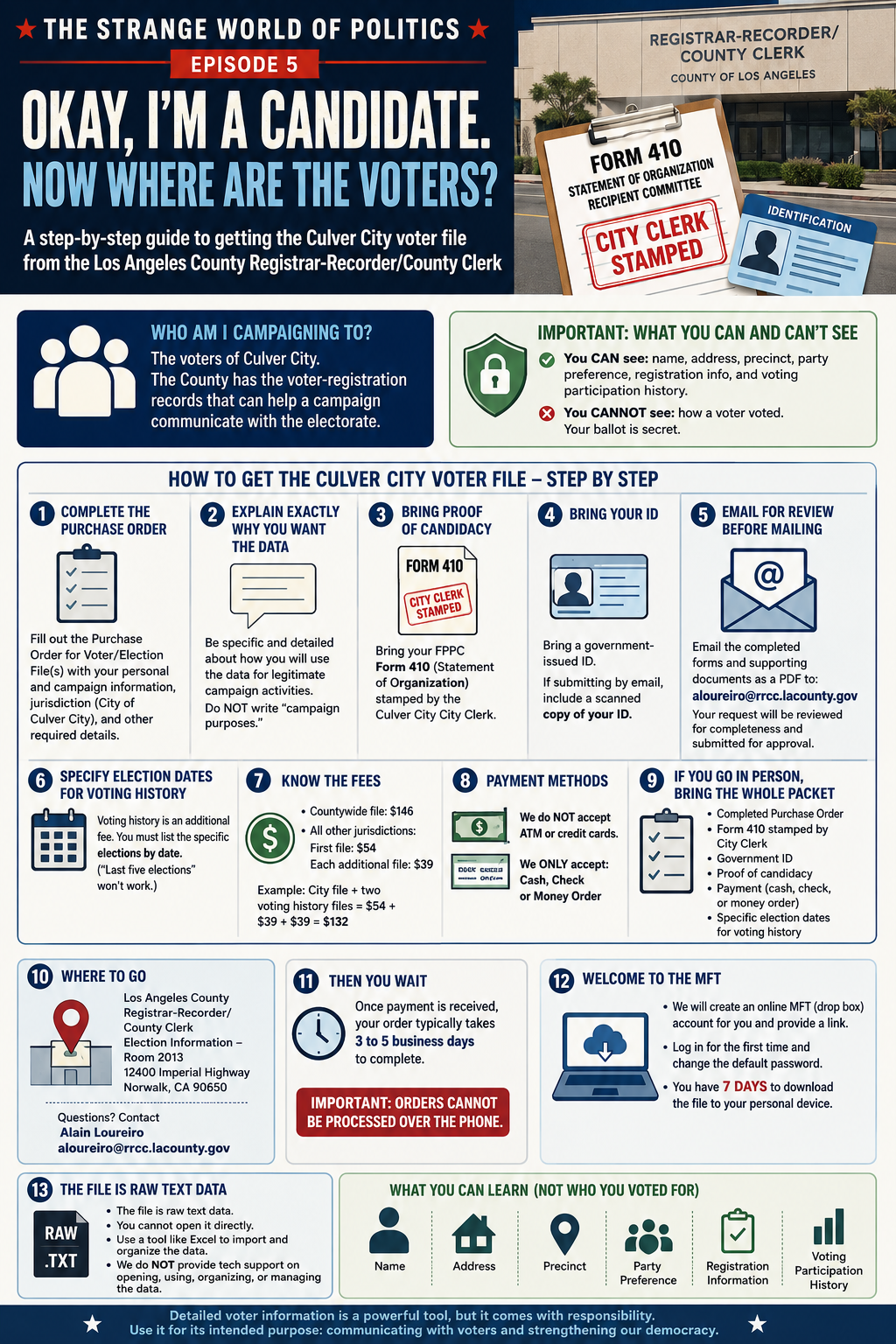
Welcome to Episode 5 of The Strange World of Politics.
Okay. I’m a Candidate. Now What?
Once you leave the City Clerk’s office, something interesting happens.
The government has spent all this time explaining how to become a candidate.
But the government doesn’t run your campaign for you.
Now you have to figure that part out yourself.
So I started with what seemed like the most obvious question imaginable:
Who exactly am I campaigning to?
The obvious answer:
The voters of Culver City.
Great.
Where are they?
Apparently, There Is a List
This was my next discovery.
Political campaigns don’t necessarily begin by randomly walking around a city looking for people who might be registered to vote.
The government already has voter-registration records.
Because Culver City is in Los Angeles County, voter information for legitimate election purposes can be requested through the Los Angeles County Registrar-Recorder/County Clerk (RR/CC).
The county can provide voter files for a particular jurisdiction.
In my case:
The City of Culver City.
But, naturally, there is a process.
No, You Can’t Just Download the Voter List
Detailed voter-registration information is not simply a public spreadsheet that anyone can download for whatever purpose they want.
California restricts access to voter-registration information and how authorized recipients may use it.
Candidates for public office are among those who may obtain voter information for legitimate election and campaign purposes.
That means I can request the Culver City voter file because I am running for City Council and need to communicate with voters.
But there are rules.
The information has to be used for an authorized purpose, handled appropriately, and protected from unauthorized use.
And there is another very important distinction:
Candidates cannot see how you voted.
Your ballot remains secret.
What Can a Candidate Learn?
Depending on what information is available and releasable, a voter file can contain information such as a voter’s:
Name
Residential address
Mailing address
Precinct
Party preference
Registration information
Voting participation history
That last category is particularly interesting.
Voting history does not tell a campaign whom you voted for.
Instead, it can indicate whether you participated in particular elections.
For example:
2022 General Election — Voted
2024 Primary Election — Voted
2024 General Election — Voted
The campaign knows that you participated.
It does not know whom you voted for.
And suddenly I understood why campaigns want these files.
Politics Just Became Data Analysis
Imagine two registered voters.
One has voted in practically every election for the past several years.
Another has been registered for years but rarely votes.
Both are registered voters.
Both deserve to be heard.
But for a campaign with limited money, volunteers, and time, their participation histories provide different information about how likely they may be to vote in the upcoming election.
That doesn’t tell me what either person believes.
It doesn’t tell me whether either person supports me.
And it certainly doesn’t guarantee how anyone will vote.
But it gives a campaign another piece of information.
And now I understand something I never really thought about before becoming a candidate:
Those political door knocks aren’t necessarily random.
So How Do You Actually Get the Culver City Voter File?
I contacted the Los Angeles County Registrar-Recorder/County Clerk and received detailed instructions directly from Alain Loureiro.
His email is:
This turned out to be extremely helpful because there are several steps that are easy to miss.
Step 1 — Complete the Purchase Order
The county uses a form called:
Purchase Order for Voter/Election File(s)
The form asks for your personal information, organization or campaign information, the jurisdiction you are requesting, the reason for requesting the data, and other information.
For my request, the jurisdiction is:
City of Culver City
Step 2 — Explain Exactly Why You Want the Data
This was one of the most useful things I learned.
The form asks what you intend to do with the voter information.
Do not simply write:
“Campaign purposes.”
According to the instructions I received from the Registrar’s office, the explanation needs to be specific and detailed.
A vague answer can be rejected and delay the request.
As a candidate, I need to explain that the information will be used for legitimate campaign activities connected with my candidacy for Culver City City Council, such as communicating with registered voters and organizing voter outreach.
Step 3 — Bring Proof That You Are Actually a Candidate
Because voter files are restricted, the Registrar wants documentation showing that you qualify to obtain the information.
For a candidate, that means bringing documentation demonstrating your candidacy or intent to run.
In my case, there is a particularly useful document:
My FPPC Form 410 — Statement of Organization — stamped by the Culver City City Clerk.
So if you are a candidate going through this process, do not just show up and say you are running for office.
Bring documentation.
For my Culver City Council campaign, I am bringing:
My Form 410 stamped by the Culver City City Clerk.
That provides official documentation associated with my campaign committee.
Step 4 — Bring Your ID
This is another important detail.
The Registrar instructed me to bring:
Identification.
So my in-person packet will include my completed forms, my proof of candidacy, and my ID.
If submitting documentation electronically for review, the Registrar also instructed me to provide a scanned copy of my ID along with the supporting documents.
Step 5 — Email Everything for Review Before Mailing It
This may save a wasted trip or a rejected application.
Before mailing the request, I was instructed to email the completed forms and supporting documents, scanned as a PDF, to:
Alain Loureiro
aloureiro@rrcc.lacounty.gov
He will review the application for completeness and submit it to his supervisor for approval.
Once it is approved, he will let the applicant know to proceed.
That is an important step because it gives you an opportunity to find out whether something is missing before sending payment and waiting for the order.
Step 6 — Voting History Costs Extra
The voter file itself is one thing.
Voting history is additional data.
If you want voting history, you must specify the actual election dates you want included.
You cannot simply write:
“Last five elections.”
You have to identify the elections by date.
And each additional file can result in an additional charge.
Step 7 — Know What It Costs
According to the fee information provided to me by the Registrar’s office:
Countywide voter file: $146
For other jurisdiction files:
First file: $54
Each additional file: $39
For example, if you order a city voter file plus voting-history files for two separate elections, the cost would be:
$54 + $39 + $39
So voting history can increase the total price depending on how many election files you request.
Step 8 — Do Not Bring a Credit Card
Here is another detail worth knowing before driving to Norwalk.
The Registrar told me that they do not accept ATM or credit cards for these orders.
Payment is limited to:
Cash
Check
Money order
And orders cannot be processed over the telephone.
So if you drive all the way there with nothing but a credit card, you may have a problem.
Step 9 — If You Go in Person, Bring the Whole Packet
Based on the instructions I received, my checklist for going to the Registrar’s office is now:
Completed Purchase Order for Voter/Election File(s)
Form 410 stamped by the Culver City City Clerk
Government-issued ID
Any additional documentation showing proof of candidacy
Payment by cash, check, or money order
The specific election dates for any voting-history files I am requesting
That is the packet I want with me when I walk into the office.
Step 10 — Where Do You Go?
The address provided to me is:
Los Angeles County Registrar-Recorder/County Clerk
Election Information — Room 2013
12400 Imperial Highway
Norwalk, CA 90650
For questions about the application and supporting documentation, I have been communicating directly with:
Alain Loureiro
aloureiro@rrcc.lacounty.gov
Step 11 — Then You Wait
Once the Registrar receives payment, I was told that an order typically takes approximately:
3 to 5 business days
to complete.
But then comes another interesting part of this process.
They apparently don’t hand you a nice Excel spreadsheet.
Step 12 — Welcome to the MFT
The Registrar creates an online MFT drop-box account for the purchaser.
They provide a link to the account.
The first time you log in, you change the default password.
Then the clock starts.
According to the instructions I received:
You have seven days to download the file to your own device.
So this is not something I want sitting in my inbox for three weeks while I forget about it.
Step 13 — And the File Isn't an Excel Spreadsheet
The file provided by the county is raw text data.
You cannot necessarily just double-click it and expect a beautiful spreadsheet to appear.
The county specifically warns that it does not provide technical support for opening, organizing, using, or managing the data.
The purchaser is responsible for importing the raw data into software capable of organizing it.
Excel is one possible option.
And this is where politics suddenly begins looking suspiciously like database management.
What Happens After I Get the File?
My plan is to preserve the original county file untouched and create a separate working campaign database.
Voting participation history could then help identify broad groups such as:
Frequent voters
Local-election voters
Occasional voters
Newly registered voters
Voters with limited participation history
Again, none of this tells me how someone voted.
It tells me whether the person participated in particular elections.
The campaign can then add its own information based on actual voter contacts — for example, whether someone was contacted, whether the person wants more information, what local issues they raised, or whether follow-up was requested.
The Bigger Lesson
Before becoming a candidate, I assumed campaigning was mostly:
Knock on doors.
Send mail.
Put up signs.
Talk to people.
It is all of those things.
But underneath modern campaigns is an enormous amount of organization and data.
The voter file provides the foundation.
Then campaigns decide how to organize neighborhoods, contact voters, track outreach, allocate volunteers, and spend limited campaign resources.
So the process I thought would be:
Become a candidate → Start campaigning
has actually become:
Become a candidate
↓
Complete more paperwork
↓
Prove you are a candidate
↓
Bring your City Clerk-stamped Form 410
↓
Show your ID
↓
Pay the Registrar
↓
Wait 3–5 business days
↓
Get an MFT account
↓
Download a raw text file within seven days
↓
Figure out how to turn it into a usable database
↓
Then start figuring out whom to contact
Apparently, even finding the voters requires paperwork.
Welcome to The Strange World of Politics.
0 Comments
Comments are reviewed before they appear.